
Let Google write your ads (without losing control)
Google AI Max is a new option inside your regular Search campaigns. Turn it on and you unlock a set of AI-powered tools that help write ad headlines/descriptions, match more search queries, and even pick the most relevant page on your site to send people. TL;DR, automation & creative generation wrapped into one simple toggle.
AI Max builds on Google’s already available AI tools like automatically created assets, but upgrades them offering real-time ad copy, dynamic landing-page matching and smarter search term matching.
Why AI Max matters now
Reach new search queries. AI Max looks beyond your fixed keyword list and surfaces queries you might never have thought of. Reportedly, accounts testing the feature are seeing up to 14% more conversions without raising the cpa.
Auto-generate ad copy that fits intent. The system crafts headlines and descriptions based on your landing page content, existing ads and keyword context helping match user intent more accurately.
Stay in control & transparent. Unlike some well talked about “black-box” products, AI Max still gives full search term reports, allows you to remove any generated copy you don’t like and supports negative keywords, brand controls, URL exclusions and other guardrails.
For small businesses this is a powerful way to scale Google Ads without spending hours writing promos or combing through keywords, whilst avoiding wasted spend on irrelevant queries.
How to get started with AI Max
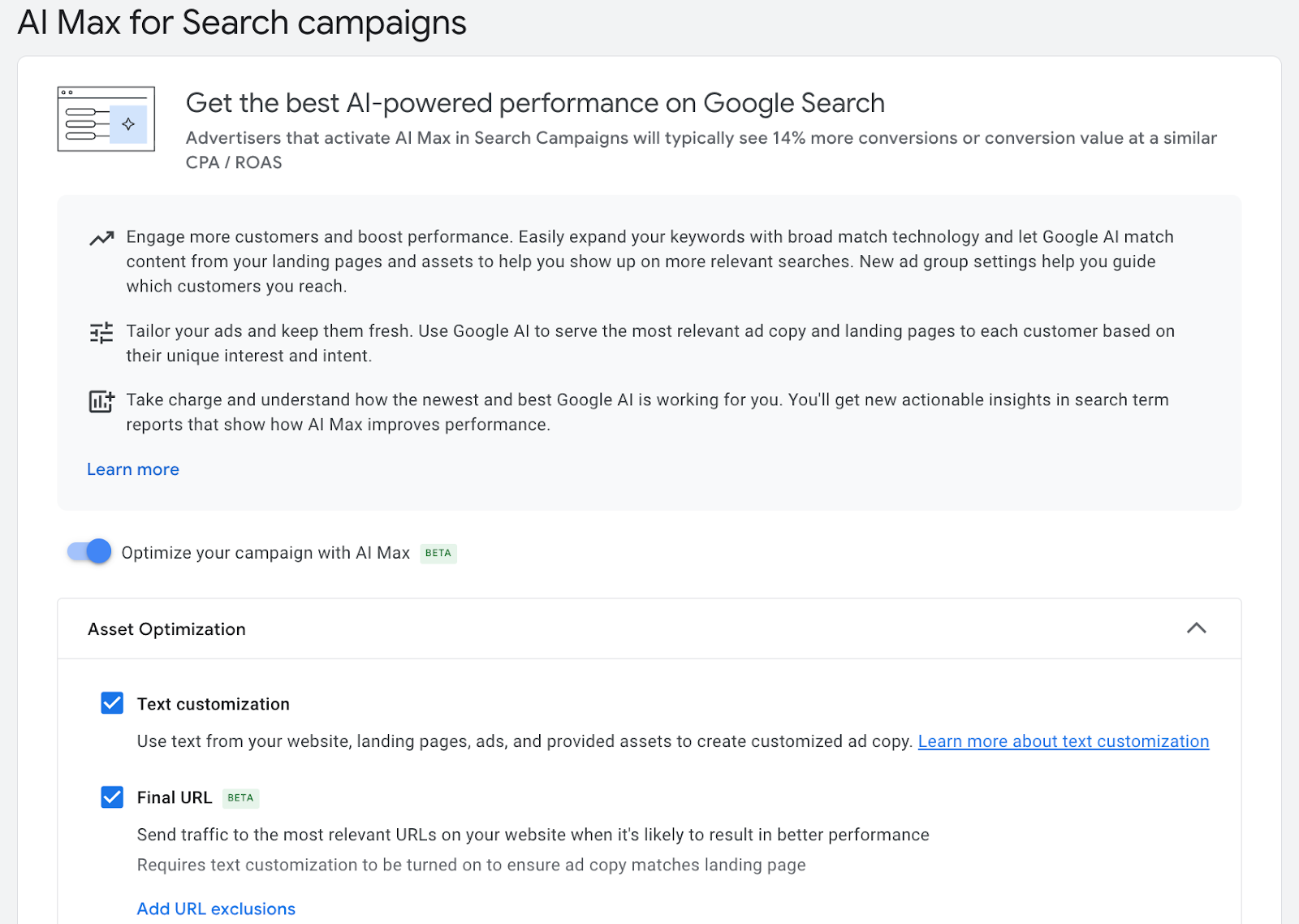
In your existing or new Search campaigns and at the campaign level, go to Settings > AI Max > Asset optimisation and enable Text Customisation. This replaces the old “automatically created assets” setting.
Provide a strong seed: well-written landing pages, good existing ads, and relevant keywords help the AI build better ad copy.
Pair with ample budget and Smart Bidding (e.g. Target CPA or ROAS), AI Max works best when there’s enough data flowing through to learn.
Review search-terms and asset reports regularly. Remove irrelevant assets; add strong converting queries as keywords; expand negative keyword lists.
Is AI Max right for you?
AI Max makes sense if:
You want to test new search demand but don’t want to build massive keyword lists.
You’re short on time or resources to write & test ad copy.
You run Search campaigns already and want to layer smarter targeting & creative automation without jumping to a fully automated campaign type.
It might be less helpful if:
You need full control over every keyword/match (e.g. regulated industries).
You run very small budget campaigns AI Max needs adequate data volume to learn.
Ready to test AI Max but not sure where to start?
Run it on one Search campaign and watch how your queries, ad copy and conversions shift over the next few weeks. And if you want a second set of eyes or a more defined Google Ads strategy going into the new year, The Project Atlas is opening a few new client spots.
Have questions about AI Max or want to see if it fits your account? Send us a quick DM, we’re always happy to chat.